Local Thanos on Kubernetes
Chris Cowley
- 6 minutes read - 1215 wordsI run Kubernetes in my homelab and use the (now classic) Prometheus/Grafana stack for monitoring everything. In my experience, the thing that Prometheus does not do well is long-term storage. Prometheus’ own database is fine for a few days storage, but performance and reliability quickly degrade. There are quite a few solutions to this problem, but I choose to use Thanos, partly because Kube Prometheus Stack has very good support for it.
What is Thanos? Thanos is a project that provides a highly available, long-term storage solution for Prometheus. It is designed to be easy to set up and use, and it can be deployed in a variety of environments, including Kubernetes. Thanos works by running a sidecar container alongside each Prometheus instance, which uploads the data to a central store. This allows you to have multiple Prometheus instances running in parallel and it provides a single query interface for all of your data. In fact, one use case some of my colleagues use is to have a central Thanos instance that collects data from multiple Prometheus instances running in different environments and even continents.
I am only using a single instance and, if I am honest, the reason behind doing this is partly “because I can”. However, it does provide some benefits, such as the ability to store data for a longer period of time and to have a single query interface for all of my data. It also allows me to easily scale my monitoring setup in the future if I need to (however unlikely).
The architecture for a typical Thanos setup looks something like:
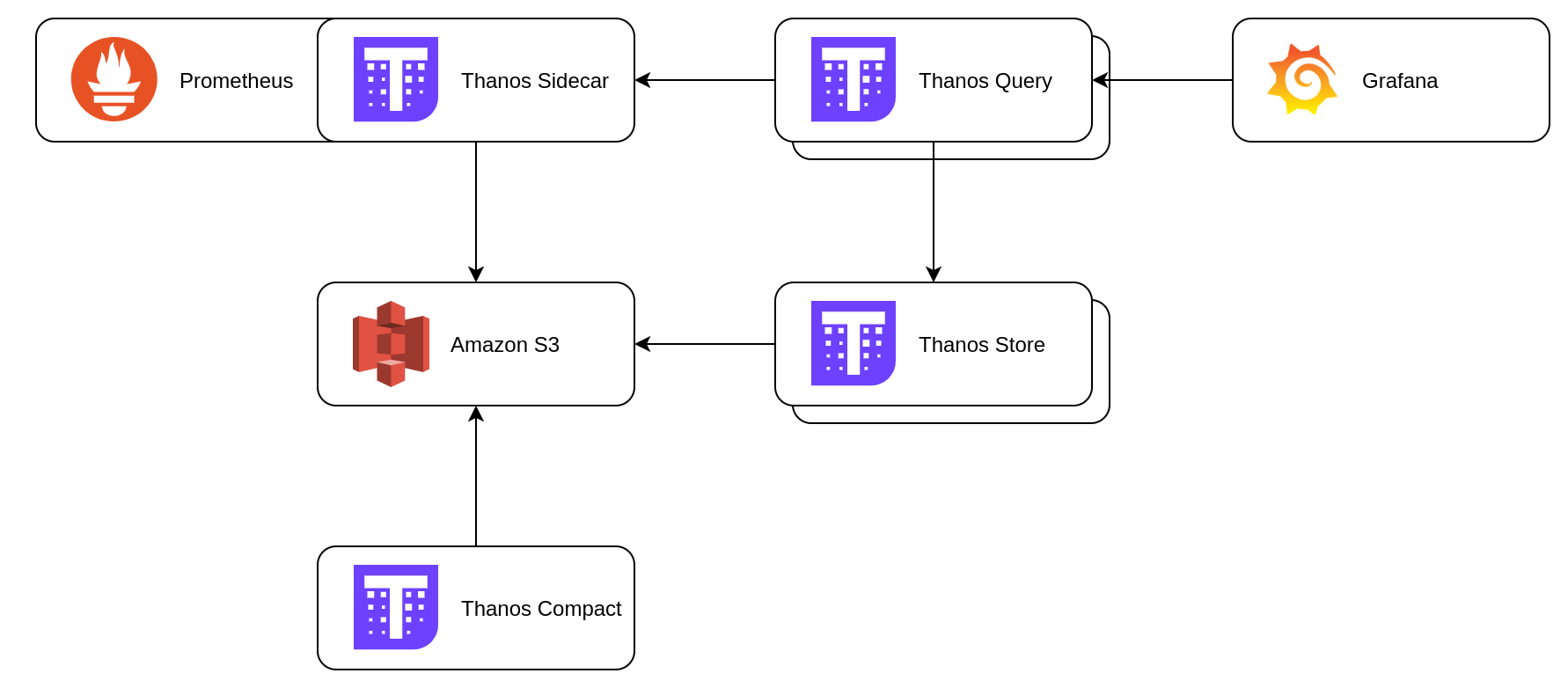
A sidecar container is added to the Prometheus Pod, which uploads to the Thanos Storage Gateway. This then writes the data to S3 for long-term storage.
And here we have a problem! I want to keep this local, so I need some S3 storage on site. For a long time, the default solution for this was MinIO, but they have stopped playing the open-source game. This is the open source world however, so there are alternatives. I choose to go with Garage because it seems pretty simple (UNIX philosophy and all that) and has excellent support for deployment on Kubernetes.
Garage deployment
As I said, Garage has really good support for Kubernetes and maintains a Helm chart.
garage:
  repicationFactor: 2

deployment:
  replicaCount: 3
  podManagementPolicy: Parallel

persistence:
  enabled: true
  meta:
    storageClass: longhorn
  data:
    size: 20G
    storageClass: longhorn-local

affinity:
  podAntiAffinity:
    preferredDuringSchedulingIgnoredDuringExecution:
      - weight: 100
        podAffinityTerm:
          labelSelector:
            matchExpressions:
              - key: app.kubernetes.io/name
                operator: In
                values:
                  - garage
          topologyKey: kubernetes.io/hostname
There is more to my values.yaml than this, but this is the important stuff that is not specific to me. I keep the replication factor at 2 and te replica count at 3 for plenty for redundancy. Notice I use longhorn-local as the storageClass. As Garage is dealing with replication, I do not want to have the overhead of Longhorn’s own replication. The config for the storageClass looks like:
apiVersion: storage.k8s.io/v1
kind: StorageClass
metadata:
  name: longhorn-local
parameters:
  dataLocality: strict-local
  fromBackup: ""
  fsType: ext4
  numberOfReplicas: "1"
  staleReplicaTimeout: "30"
provisioner: driver.longhorn.io
reclaimPolicy: Delete
volumeBindingMode: Immediate
allowVolumeExpansion: true
With that in place you can install Garage using Helm in the namespace `garage``. I use FluxCD to manage it, but you do you.
helm install garage deuxfleurs/garage -n garage -f values.yaml \
  --create-namespace
Next we need to create a bucket for Thanos to store data in and a key to allow access:
kubectl exec --stdin --tty -n garage garage-0 -- ./garage status
kubectl exec --stdin --tty -n garage garage-0 -- ./garage layout \
  assign 0bfb01a7b5bea679 -z node-0 -c 19G
kubectl exec --stdin --tty -n garage garage-0 -- ./garage layout \
  assign 2d9502223f1a7d38 -z node-2 -c 19G
kubectl exec --stdin --tty -n garage garage-0 -- ./garage layout \
  assign e54cf4ab4f03e5a4 -z node-1 -c 19G
kubectl exec --stdin --tty -n garage garage-0 -- ./garage layout show
kubectl exec --stdin --tty -n garage garage-0 -- ./garage layout apply --version 1
kubectl exec --stdin --tty -n garage garage-0 -- ./garage bucket create thanos
kubectl exec --stdin --tty -n garage garage-0 -- ./garage key create thanos-app-key
kubectl exec --stdin --tty -n garage garage-0 -- ./garage bucket allow \
  --read --write --owner  thanos --key thanos-app-key
Info
Create a bash alias to make Garage commands easier to run:
alias garage="kubectl -n garage exec -it garage-0 -- ./garage"
When you created the key, it will have output the access and secret keys. Create a file called objstore.yml with the followin content:
type: S3
config:
  bucket: thanos
  endpoint: garage.garage.svc.cluster.local:3900
  region: garage
  access_key: <your access key here>
  secret_key: <your secret key here>
  insecure: true
  signature_version2: false
Now create a secret from this file:
kubectl --namespace monitoring create secret generic thanos-objstore \
  --from-file objstore.yml
How you keep that secure and versioned is an exercise for the reader (I use Sealed Secrets). In any case, now you we can move on to Prometheus/Thanos and that will hinge around that secret.
Adding Thanos sidecar
Like many in the Kubernetes world, I use Kube Prometheus Stack which has first class support for Thanos.
prometheus:
  enabled: true
...
  thanosService:
    enabled: true
  prometheusSpec:
    retention: 6h
    externalLabels:
      cluster: lab
    thanos:
      objectStorageConfig:
        existingSecret:
          name: thanos-objstore
          key: objstore.yml
That addition to Prometheus enables the Thanos sidecar and the secret has all the information it needs to upload data to Garage. It also lowers the retention in Prometheus itself to 6 hours, which is more than enough.
With Prometheus writing to Garage, now we need to install the rest of Thanos.
Thanos deployment
The rest of Thanos is deployed using Helm also:
global:
  security:
    allowInsecureImages: true

image:
  registry: quay.io
  repository: thanos/thanos

existingObjstoreSecret: thanos-objstore

storegateway:
  enabled: true
  persistence:
    enabled: true
    size: 20Gi
    storageClass: longhorn

compactor:
  enabled: true
  persistence:
    enabled: true
    size: 20Gi
    storageClass: longhorn
  resources:
    requests:
      cpu: 100m
      memory: 512Mi

query:
  enabled: true
  replicaCount: 1
  dnsDiscovery:
    enabled: true
    sidecarsService: prometheus-kube-prometheus-thanos-discovery
    sidecarsNamespace: monitoring

  extraFlags:
    - --query.auto-downsampling

bucket:
  enabled: false
Install that using Helm in the monitoring namespace:
helm install thanos oci://registry-1.docker.io/bitnamicharts/thanos \
  --values ./thanos-values.yaml \
  --namespace monitoring
One of the key steps that makes this relatively simple was the creation of the secret with the credentials. By using the format we did, including the filename and key name, we are able to rely on defaults provided by the two Helm charts. This way we are not fighting an uphill battle for S3 access.
Now you have everything installed, but there is still a final step. For now we have Prometheus writing to Garage, with Thanos pointing at that same bucket. However, Grafana is still using Prometheus directly. What we want is Grafana to use Thanos Query, which will then decide whether to use Garage or Prometheus to serve the data. Once again we modify the values for Kube Prometheus Stack:
...
grafana:
...
  additionalDataSources:
    - name: Thanos
      type: prometheus
      access: proxy
      url: http://thanos-query.monitoring.svc.cluster.local:9090
      isDefault: true
      jsonData:
        prometheusVersion: 2.45.0
        prometheusType: Thanos
...
Apply that and Grafana will now have a (default) datasource for Thanos in addition to the existing Prometheus data source. Depending on your dashboards, you may need to update them to use the new datasource.
Conclusion
There you have it: scalable, long-term, completely local metrics storage in Kubernetes. I would have liked an automated way to pass the S3 credentials from Garage to the Thans secret, but this works. If anyone has any suggestions I am all ears.