Running Hugging Face models on Ollama
Chris Cowley
- 4 minutes read - 806 wordsAs part of my continuing experiments with AI, I regularly use models from Hugging Face. Ollama makes it really easy to run models locally from their own repo, but sometimes they do not have exactly the model one wants.
Why Use Hugging Face
While Ollama has its own curated repository of models you can use, Hugging Face has kind of become the community default. The choice is much larger and opens up possibilities that are not available if you just stick with Ollama’s own repository. For mainstream models, there maybe quantization that are not available in Ollama’s own repo. There are plenty of fine-tunes of more mainstream models that are only on Hugging Face.
Of course, it would be remiss of me to not at least cover why we would want to run local models, so here is a generic, partly AI (from Hugging Face) generated, blurb about why to run local models:
- Control: You are not dependent on an API or provider. You control the models and update lifecycle and it all runs on your own infrastructure.
- Predictability: With hosted LLMs, you pay for your token usage, which is unpredictable at best. Host it yourself and you are paying for hardware an electricity.
- Privacy: You keep control of your data and you can train it on what you want.
- Education: Running it yourself allows real understanding of how these things work
Hugging Face with Ollama
By default a model from Hugging Face does not necessarily work with Ollama, the bridge is GGUF.
What is GGUF? GGUF is a format optimized for inference with llama.cpp-based runtimes.
It enables:
- efficient CPU/GPU execution
- quantized models (smaller, faster)
- compatibility with local runtimes like Ollama
In practice, GGUF is what makes Hugging Face models usable on local hardware.
Choosing the Right Model
This is where most of the real work happens. Before anything else, decide what you need:
- coding assistant?
- summarization?
- general chat?
- structured outputs?
Different models excel at different tasks and (especially with smaller models) they tend to be heavily optimised for one thing at the expense of others.
Larger models are not always better in practice.
- 7B–13B: fast, responsive, widely usable
- 30B+: stronger reasoning, higher requirements
- 70B: often impractical without high-end hardware
Key point: a smaller model you can run well is more useful than a larger one you can barely run - especially on the sort of hardware you can realistically run in a homelab.
Quantization reduces memory usage and speeds up inference.
Common options:
- Q4: very efficient, lower quality
- Q5/Q6: strong balance
- Q8: higher quality, more resource-intensive
In many real setups Q4_K_M or Q5_K_M is a good trade off, whereas Q8 would be too resource intensive. This is often the difference between “usable” and “frustrating”.
Unless you have a specific reason otherwise, choose Instruct, Chat or Assistant variants. These are optimized for interaction and require far less prompt engineering.
Finally, context size determines how much information the model can handle.
- 4K for basic usage
- 8K–16K is comfortable
- 32K is useful for longer inputs
Larger context increases memory usage and performance may degrade. Choose based on your actual needs, not just maximum capability.
Running a Model in Ollama
Once you have chosen a model, using it is very simple. On the model’s page on Hugging Face, you will see a “Use this model” button:
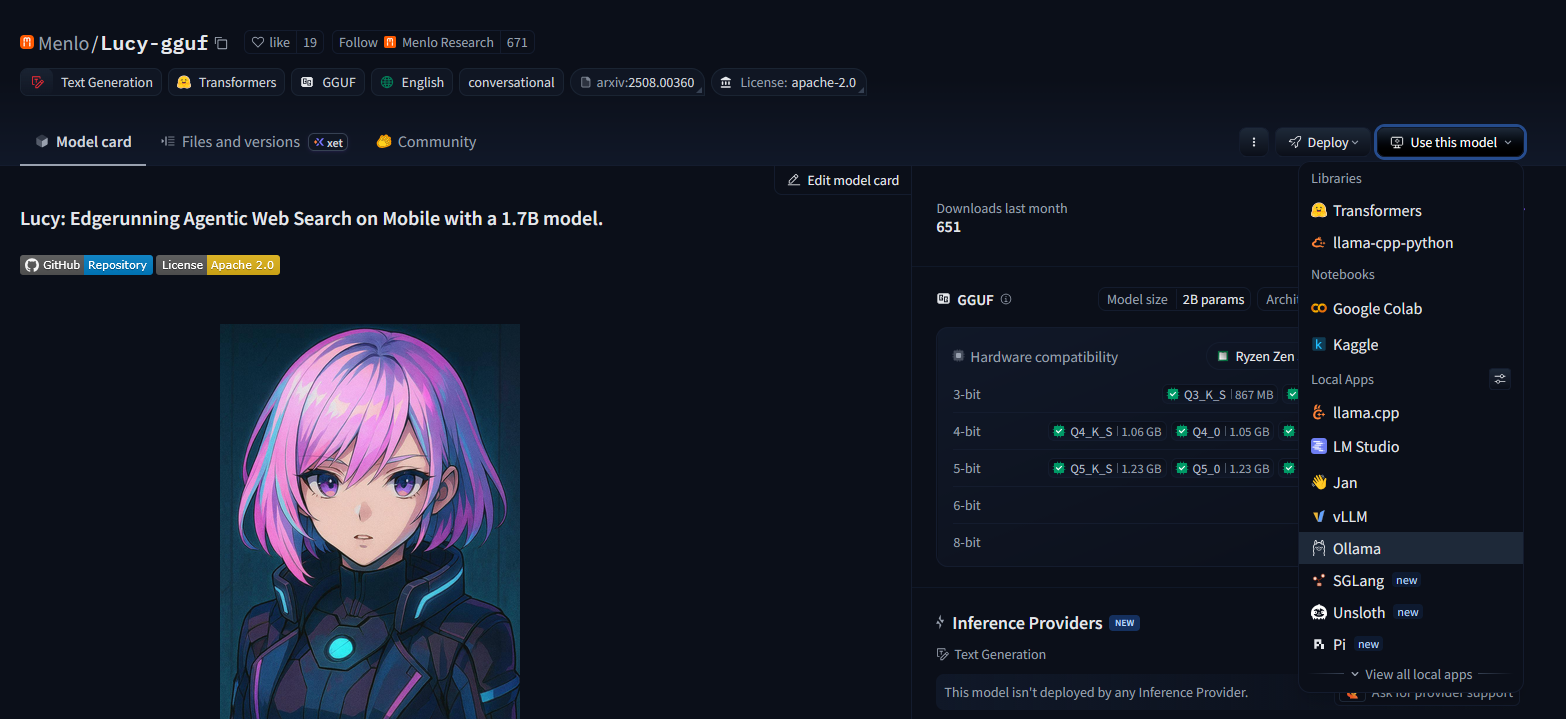
Click that button and you will see “Ollama” as an option. Click that and you will get a window with the precise command to run, which in the above example is ollama run hf.co/Menlo/Lucy-gguf:Q4_K_M with a option to choose different quantization levels.
Conclusion
That is it! You have now opened up a whole world of new models to play with. To get you started, a couple of models that I have found particularly useful are:
- Lucy: Far better at reasoning and web search than any 1.5B model has any right to be.
- Jay Nano: A surprisingly good coder considering how small he is compared to a 30B Qwen-coder model.
Once the model is in Ollama, it becomes available to the wider ecosystem of tools that can use Ollama. I use these alongside various things:
- n8n
- OpenwebUI
- Pi mono
- Opencode
- Home Assistant
- whatever else takes my fancy
If you’re experimenting with local LLMs, Hugging Face provides the breadth of models, and Ollama provides the simplicity to run them. The combination is a powerful way to move from experimentation to practical use.
Life is not all fluffy kittens and knitting however. Occasionally you will come across models that do not work how you hope, but if you stick to popular providers (such as Menlo or Unsloth among others) you should be fine. Also, the LLM space moves REALLY fast, so make sure you are on the latest version of Ollama before trying a new model. I recently go bitten by that while experimenting with Gemma4.